How DNS Resolution Works
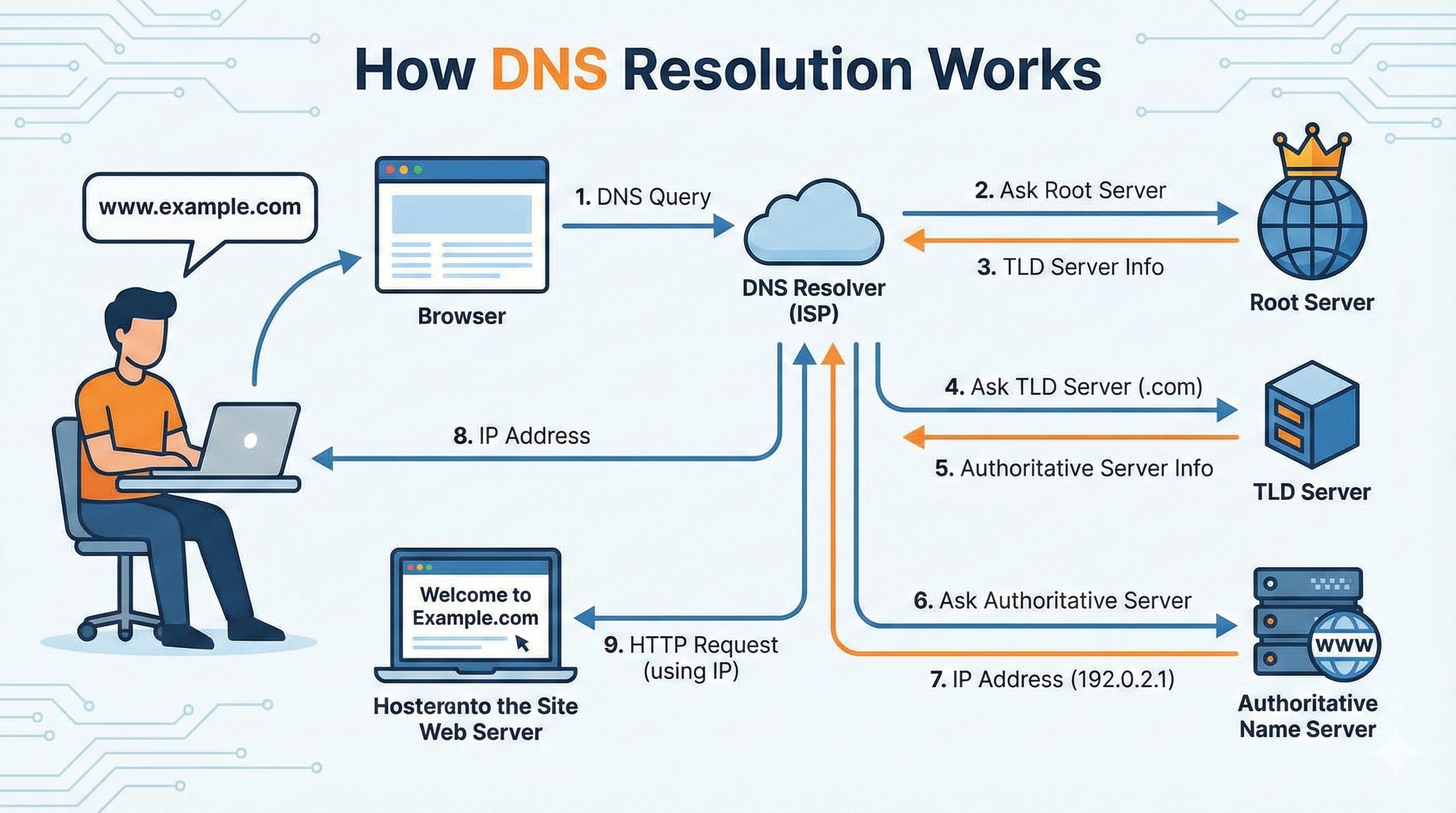
Ever wonder what happens in that split second between typing google.com and seeing the page load? Let me show you something cool.
DNS: The Internet's Phonebook
You know how your phone stores contacts? Instead of remembering that Ex ❤️🩹 number is 420-0420, you just tap "Ex ❤️🩹" and call her.
DNS does the same thing for websites. When you type google.com, your computer needs the actual address: 142.250.185.46. DNS translates the name into numbers. Simple as that.
Without it, you'd be memorizing IP addresses for every site you visit. No thanks.
The dig Command: Your DNS Detective Tool
Want to see this magic in action? There's a command called dig that shows you exactly how your computer finds websites.
Open your terminal and try:
dig google.com
Boom. You just watched DNS work in real time.
The Secret: DNS Works in Layers
Here's what blew my mind. DNS isn't one giant phonebook. It's more like asking for directions to an apartment:
Root servers → Which city? (the starting point)
TLD servers → Which neighborhood? (the .com, .org part)
Authoritative servers → Which exact building? (google.com specifically)
Let me show you each layer.
Step 1: The Root Servers
dig . NS
That dot? It's the root of the entire internet. Run this and you'll see servers like a.root-servers.net. There are only 13 of these worldwide.
They're the starting point. They don't know where google.com is, but they know who does.
Step 2: The TLD Servers
dig com NS
TLD means Top Level Domain (the .com part). These servers handle all .com websites. You'll see results like a.gtld-servers.net.
They still don't know Google's exact address, but they know who to ask next.
Step 3: The Authoritative Servers
dig google.com NS
Now we're talking to Google's own servers (like ns1.google.com). These have the final answer because Google runs them.
This is where the real address lives.
Step 4: The Full Journey
dig google.com
This shows the final IP address. But behind the scenes, your computer just did this:
Asked a root server → "Who handles .com?"
Asked a TLD server → "Who handles google.com?"
Asked Google's server → "What's the IP?"
Got the answer → 142.250.185.46
All in milliseconds.
What's an NS Record?
NS means Name Server. It's basically an arrow pointing to the next step.
dig com NS asks "Who should I talk to about .com sites?" dig google.com NS asks "Who should I talk to about google.com?"
Think of them as signposts on a highway.
The Hidden Helper: Recursive Resolvers
Your computer doesn't actually do all this work. It asks a recursive resolver (usually from your internet provider) to do it.
Even better? Resolvers remember answers. Visit google.com twice and the resolver just recalls the answer from memory. No need to ask again.
When You Type a URL
Here's the real flow when you visit google.com:
Browser asks for the IP address
Computer checks its memory
If not there, asks the resolver
Resolver does the root → TLD → authoritative dance
You get the IP back
Browser connects and loads the page
Steps 1 through 5 take maybe 20 milliseconds. You never even notice.
Why This Matters
Next time a website won't load, you can use dig to check if DNS is the problem. Plus, understanding this makes you realize how brilliantly the internet is designed.
No single company controls it. Root servers, TLD servers, and authoritative servers are all run by different organizations. It's decentralized and it just works.
Watch the journey unfold. Try it with any website you like. It's like a treasure hunt across the internet.
Try It Yourself
If you want to explore this yourself, open your terminal and try these commands in order:
dig . NS
dig com NS
dig google.com NS
dig google.com
Watch how each command gives you information that leads to the next step. It's like following a treasure map across the internet.
You can replace google.com with any website you want. Try your favorite sites and see how their DNS is set up.
Wrapping Up
DNS might seem complicated at first, but it's really just a clever system for translating names into numbers. The dig command lets you see exactly how that translation happens, layer by layer.
Every time you browse the web, this whole system springs into action. Billions of times a day. And it happens so fast you never think about it.
Pretty cool, right?


